You can log in by using the same username and password that you use for the website. Please note that both username and password are CaSe sensitive.
If you've forgotten your password, you can reset it by using the password reset page.
6 articles
You can log in by using the same username and password that you use for the website. Please note that both username and password are CaSe sensitive.
If you've forgotten your password, you can reset it by using the password reset page.
First, ensure that all antiviruses are fully disabled.

Ensure that Core Isolation is disabled.

Ensure that Game Mode is disabled.

You must restart your computer.
After restarting your computer, ensure your antivirus remains disabled.
Open CS2. Set your game to full screen windowed.
Run the loader.
Select your product and click load.
Press "insert" to open the menu.
You can request a HWID reset by clicking the "Request HWID Reset" button on your account dashboard.
To fix this issue, take the following steps:
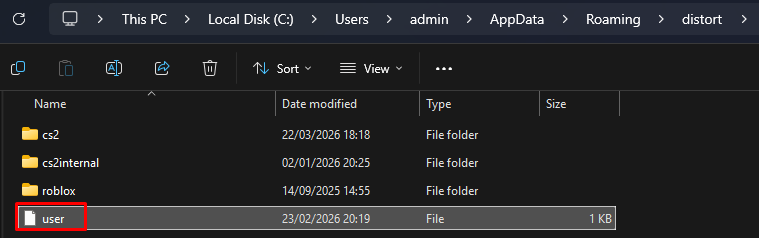
Head to %appdata% and find the Distort folder.
Delete the "user" file inside of the folder, and then try again.
This error is caused by your internet service provider (ISP) blocking the SSL connection to our server.
To fix this issue, please do one of the following:
Connect to a VPN before running the loader. You can disable the VPN after injection.
You can use any VPN. We recommend ProtonVPN as a free solution.
Alternatively,
Review your router’s security settings for the blocked SSL requests and allow them.
Since router interfaces vary, consult your router manual or contact your ISP for further instructions.

If you see this error it means that you took too long to open CS2 after running the software.
To fix this issue, please run your game immediately after running the loader, or inject with your game already opened.